Project Solution Accelerator

One of the major announcements at Ignite was a solution Accelerator for the new Project, aka, Project for the Web (P4W). The accelerator is being developed by Microsoft and will include items such as project requests, issues, risks, programmes, and will create some additional functionality for P4W to bring it more inline with the existing Project […]
A whole host of Power BI content – Power BI Lunch and Learn and the Manchester Power BI user group
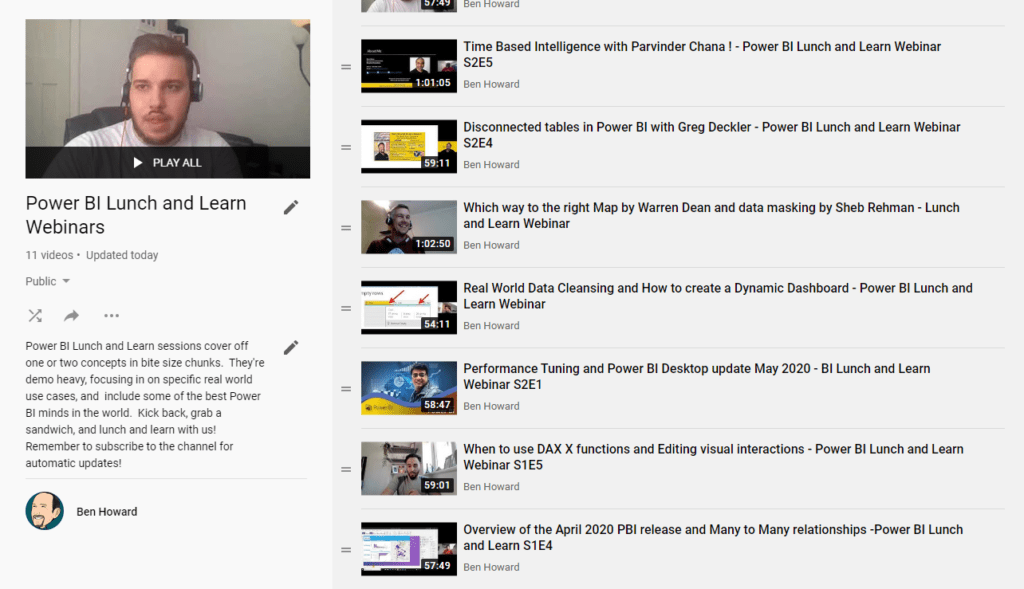
Over the last four years I’ve spent a lot of time working in both Power BI and using the similar tools in Excel (for those of you who didn’t know Power BI was “born” in Excel, or at least as an Excel add-in (PowerPivot)). As part of giving back to the community, I’ve been co-running […]
Planner Tasks Power BI Template on GitHub
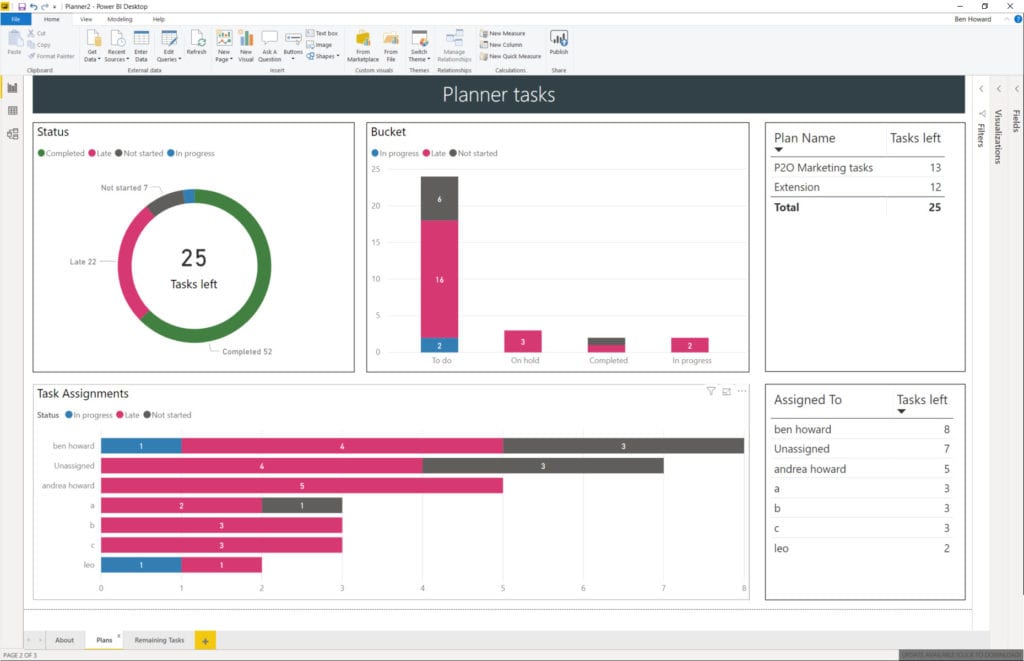
Microsoft are retiring content on TechNet, and so I’ve taken this opportunity to slightly modify the Planner Power BI template, and move it over to GitHub. At the same time I recorded a video of how to use the template file – I didn’t cover the whole of template usage because that’s been done in […]
Updated Planner Tasks Power BI Template
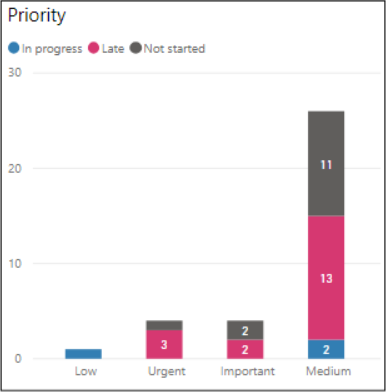
Planner Priority field #2 It’s great when Microsoft copy one of your ideas 🙂 Back in Sept 2019 I updated my Planner Template to include the Priority field. Microsoft have now included the Priority field in their own charts as blogged here by the product team. Here’s the Priority visual spotlighted in my Power BI […]
Planner Tasks now have a Priority field
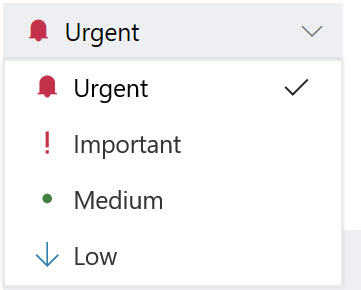
This is just a quick blog post to say that Planner now includes a priority field for each task. The priority can be Urgent, Important, Medium (default) or Low. Setting of the priority is easy, but what’s really nice is the ability to filter and group by priority as displayed in the next two images. […]
PowerBI Template for Exported Planner Plans

<Update 10th September 2019> The Power BI template now supports the Priority field, and an additional two tabs have been created, one to display the tasks by priority, and another with a buttons to switch easily between the status or priority views. As well as links to the template at the end of this post, […]
Project Server Work and Capacity graphs in Power BI
A lot of my work now revolves around producing Power BI reports using the Project Server oData feed (you can find my reporting pack for Project Server here) , and of course one of the main goals is to produce great looking work and capacity graphs, so let’s have a look at how to do […]
Resource work and capacity graphs in MS Project
A customer posed the challenge earlier this week of producing a work and capacity report using the Reports feature in MS Project. Using the existing Resource Overview Report I was happy with getting the total work per resource from the project, as this is already available as a graph on the Resource Overview report. You […]
#ESC2017 – Take Project Server from 0-60 in 1 Hour
European SharePoint Conference 2017 At the back end of last year I was honoured to be able to speak at the ESC2017, the second time I’ve spoken at the ESC. The title this year was taking Project Server from 0-60 in one hour… so what does that mean. In a nutshell what I was able […]
#Project Server #Power BI Content Pack with Currency parameter
Microsoft have very recently released their latest content pack for Project Server and details can be found on the Project Support Blog and the Tech Community Blog. Whilst the new content pack is a big improvement on the previous one, it still requires some work if you are NOT working in English or US Dollars! […]
#Agile in #MSProject #Scrum #Kanban
Microsoft Project has long been considered as a tool that can only be used with structured , rigid tasks. Typically this type of project is known as a Waterfall project (despite various blogs showing you how you can use Project to manage an “agile plan”, for example the MPUG publish one here). I’m pleased […]
Link to Planner from MS Project #MSProject #ProjectOnline #MSPlanner
There has been some speculation that Microsoft might provide a link between MS Project and Microsoft Planner for quite some time, and now it seems that they’ve done it. From the Task tab, you should be able to see the Link to Planner button (highlighted below). You can only link a single task to a […]
Kyiv Presentations #ProjectOnline #Project
I was lucky enough to be invited back to Kyiv by fellow MVP Oleksiy Prsonitskiy to present at the Ukrainian Project Conference. If you’ve never been to Kyiv, it’s worth the effort with some great sights and great food. https://mvp.microsoft.com/en-us/PublicProfile/4032153?fullName=Oleksiy%20%20Prosnitskiy http://www.project-conference.com.ua/ I presented on two topics, Microsoft Planner and Reporting in Project Server. Microsoft Planner […]