Quick Hack to create a Lipstick Chart in Power BI

Use this Power BI template to report on Labels from you P4W projects.
New Project for the Web labels available in Power BI
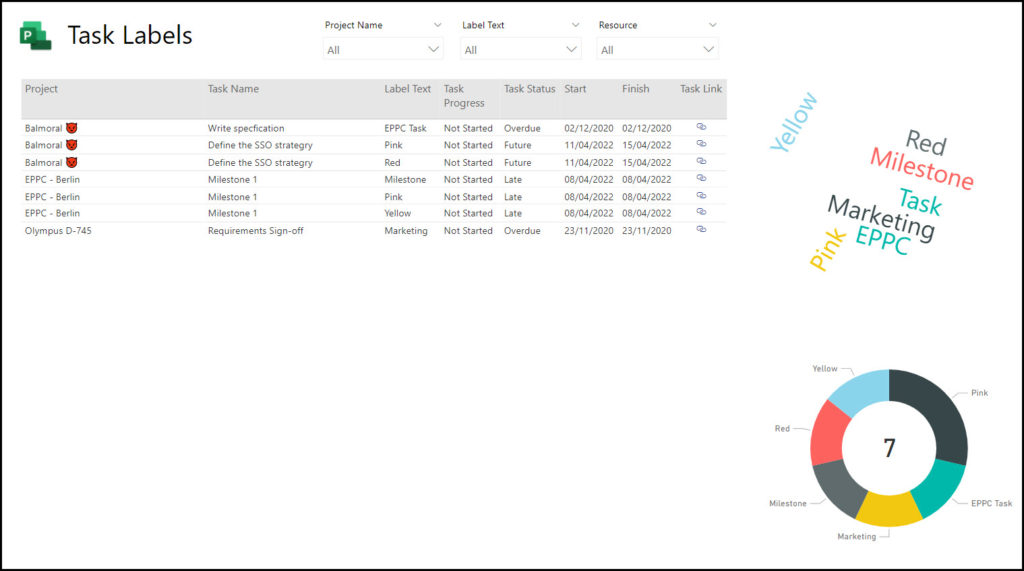
Use this Power BI template to report on Labels from you P4W projects.
Error when loading a new query – OLE DB or ODBC error 10 keys were specified, but 5 values were provided
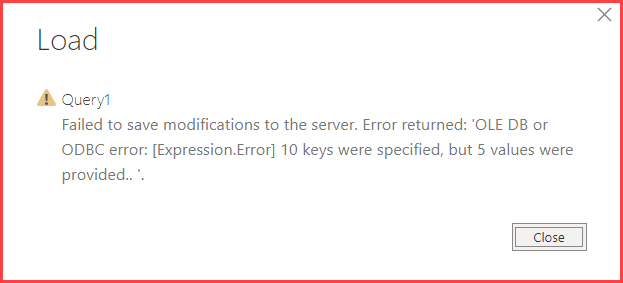
I recently had an issue in Power BI when trying to add in an additional query. The screenshot of the error message is displayed below. The error isn’t hugely helpful, and it took a long time to resolve it. In the end it turned out to be […]
Teams Apps for Project and Roadmap

There have recently been a couple of apps introduced into Teams that consolidate the Microsoft Teams experience around collaboration and especially Project Management. These are the Project App and the Roadmap, which when added to the Planner App, ensure that all of the modern applications designed by Microsoft specifically aimed a Project Managers are now […]
Project Solution Accelerator

One of the major announcements at Ignite was a solution Accelerator for the new Project, aka, Project for the Web (P4W). The accelerator is being developed by Microsoft and will include items such as project requests, issues, risks, programmes, and will create some additional functionality for P4W to bring it more inline with the existing Project […]
A whole host of Power BI content – Power BI Lunch and Learn and the Manchester Power BI user group
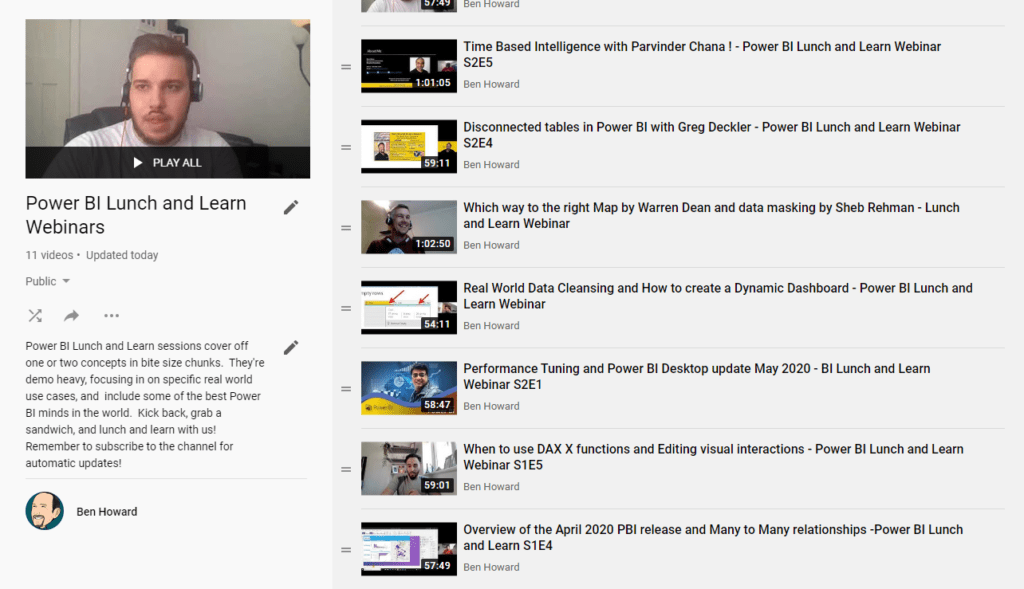
Over the last four years I’ve spent a lot of time working in both Power BI and using the similar tools in Excel (for those of you who didn’t know Power BI was “born” in Excel, or at least as an Excel add-in (PowerPivot)). As part of giving back to the community, I’ve been co-running […]
Planner Tasks Power BI Template on GitHub
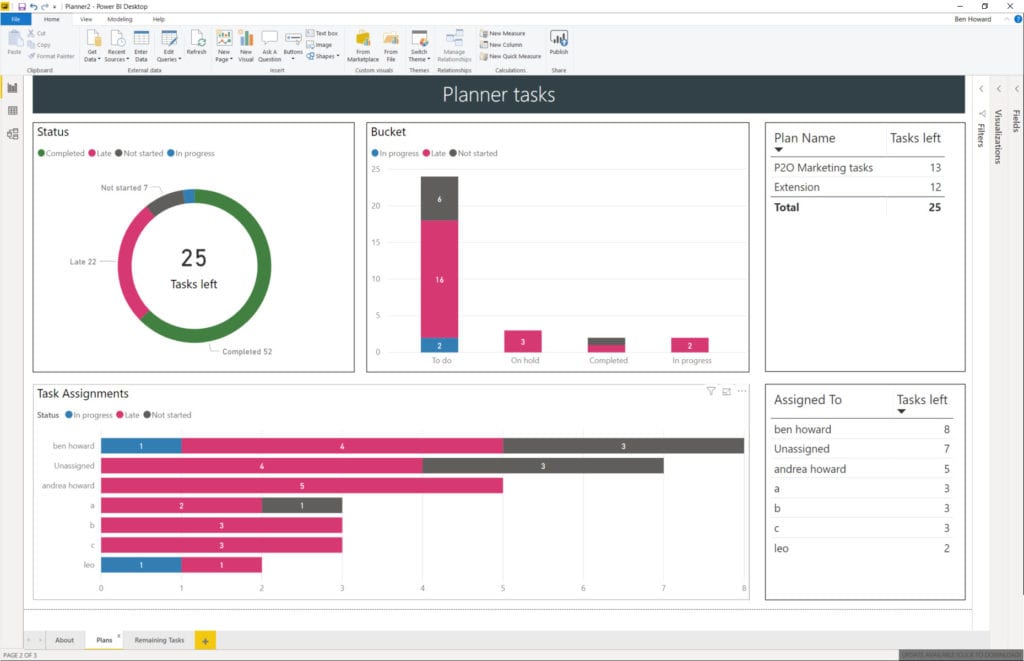
Microsoft are retiring content on TechNet, and so I’ve taken this opportunity to slightly modify the Planner Power BI template, and move it over to GitHub. At the same time I recorded a video of how to use the template file – I didn’t cover the whole of template usage because that’s been done in […]
Updated Planner Tasks Power BI Template
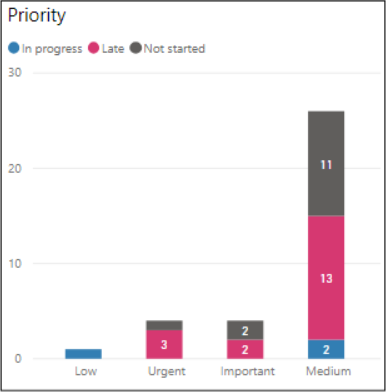
Planner Priority field #2 It’s great when Microsoft copy one of your ideas 🙂 Back in Sept 2019 I updated my Planner Template to include the Priority field. Microsoft have now included the Priority field in their own charts as blogged here by the product team. Here’s the Priority visual spotlighted in my Power BI […]
Displaying the current plan and multiple baselines
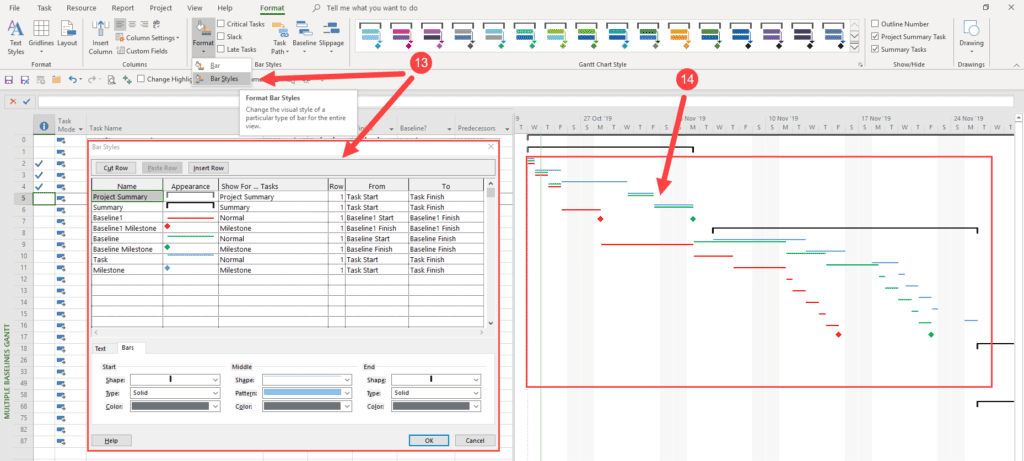
Project has the ability to hold 11 baselines, and I’m often asked to devise a process whereby my client can track the current plan, the original plan, and any approved changes (design changes and the like). So, here’s the theory and the process. Once the project has been scheduled, and prior to execution, the project […]
Planner Tasks now have a Priority field
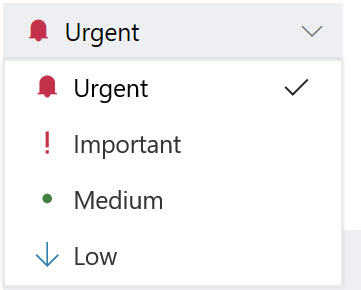
This is just a quick blog post to say that Planner now includes a priority field for each task. The priority can be Urgent, Important, Medium (default) or Low. Setting of the priority is easy, but what’s really nice is the ability to filter and group by priority as displayed in the next two images. […]
PowerBI Template for Exported Planner Plans

<Update 10th September 2019> The Power BI template now supports the Priority field, and an additional two tabs have been created, one to display the tasks by priority, and another with a buttons to switch easily between the status or priority views. As well as links to the template at the end of this post, […]
Updated PowerBI Template for Project Server
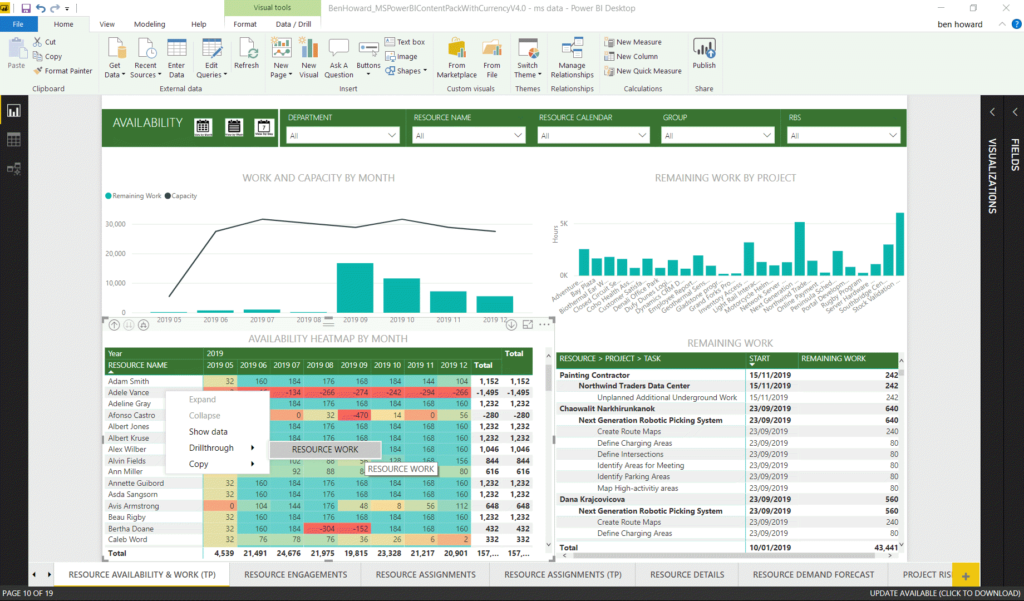
Updated Power BI Content Pack – drill through and buttons! Power BI has definitely become my favourite application (after Project of course) in the Microsoft suite simply because of its power and versatility. In the past I’ve taken Microsoft’s standard content pack (available here) and modified it to expand the number of languages supported […]
Auto Calculate
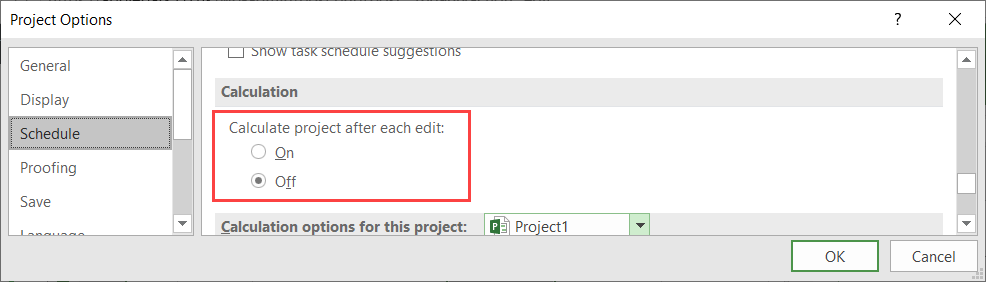
Recently one of my customers was having an issue with Project not “behaving”correctly. As I was demonstrating how Project works, he was doing the same but without anything updating on his project. I don’t often see this problem and so it took me 30 seconds or so to work it out. Here’s an example of […]
Best Practices for Integration of Microsoft Project and Excel
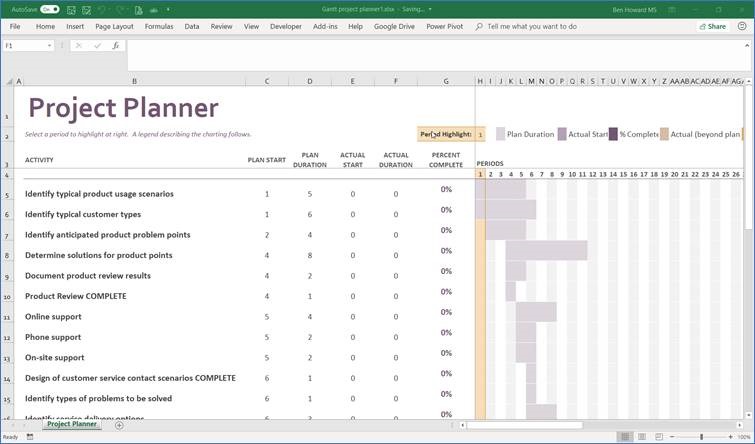
Introduction This article discusses Project and Excel integration points, specifically in the following areas: How to import data from Excel to Project Importing an initial last list How to export data from Project to Excel Exporting a to-do list for resources Exporting time-phased data for reporting Why Bother with Excel? First things first! My view […]
Permissions Mode
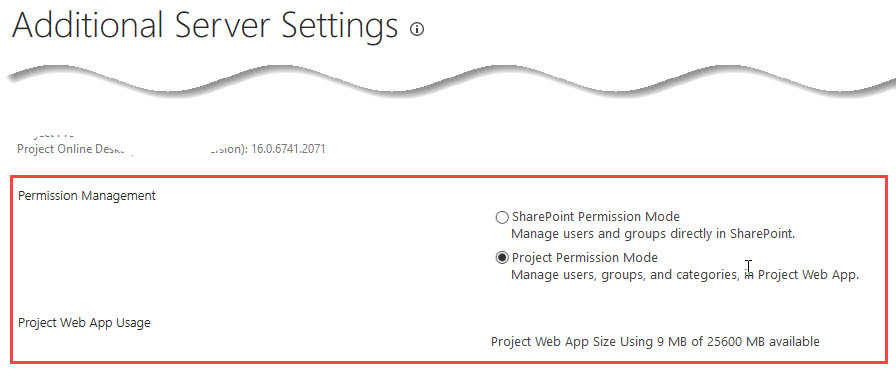
Introduction This is really the briefest of blogs to let you know of a UI change away from SharePoint to Project Server. Permissions Modes Since Project Server came into being there have been two permissions modes, the default SharePoint one, and the older (because it was always there in Project Server) and more configurable Project […]
Managing Sprints in Project
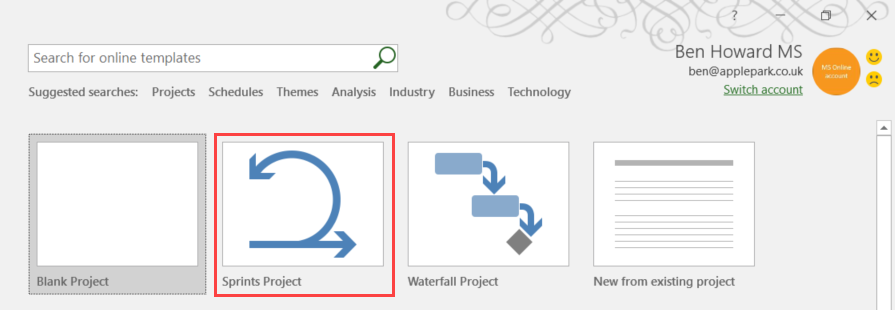
Introduction This is the second in a two part series covering the Agile capabilities of Microsoft Project. In the first article, we discussed Kanban boards. Now we will look at Microsoft’s Scrum implementation, or, to use the Microsoft terminology, Sprint Projects. What is a Sprint Project and a Sprint? A Sprint Project is a Microsoft […]
Using Row Level Security to Auto Filter your Power BI Reports
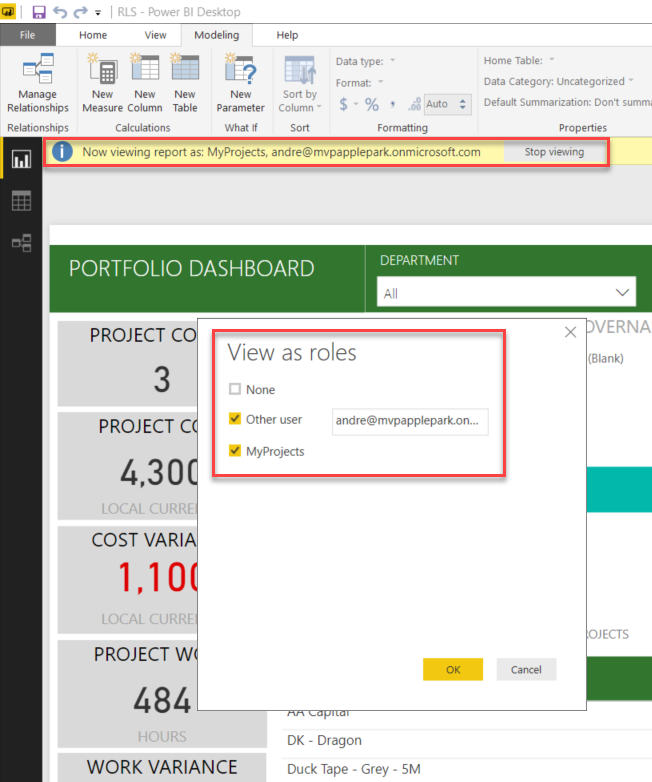
Without a doubt I think Power BI is one of the greatest tools Microsoft has released in the last few years, it truly has revolutionised and democratised data (oh no, I’m beginning to sound like a Microsoft employee). What I really meant to say is that it’s made accessing Project Server data really easy […]
Using Kanban Boards in Microsoft Project

Introduction There has been a lot written over the last year regarding Microsoft’s foray into the world of Agile Project Management by way of new improvements into Microsoft Project. This article provides an update based upon one of the latest versions, discusses what’s changed recently, and provides a walkthrough on setting up and using the […]
Project Server Content Pack Multiple Language Support – now with Polish language
Modifying Microsoft’s #ProjectOnline #PowerBI Content Pack to Support Your Language – Polish, Russian and now Polish. <180822 – Update> A quick note of thanks to Bartek from Poland for his Polish contribution – the download is still available from here. <\180222 – Update> This article shows you how to modify Microsoft’s standard Project Server […]
Modifying the Menus in Project

Modifying the Menus in Project Over the years I have run hundreds of training courses and one of the issues I often hear from people is the complexity of the ribbon, because there are simply too many icons, and people aren’t sure which ones to use at which stages during their project management process. Additionally […]
Creating a Date Table in Power Query
Simply because this asked for recently, here’s some M-code that you can paste into Power Query to create a data calendar – please note no warranties etc are implied by publishing this code. /* Power Query Code (M-code) to create date table Modify the StartDate and EndDate values as necessary for your data */ […]
Project Server Content Pack Multiple Language Support
Modifying Microsoft’s #ProjectOnline #PowerBI Content Pack to Support Your Language This article shows you how to modify Microsoft’s standard Project Server Content Pack to support additional languages. Content Pack Overview If you are using Project Server (PJO) then you are probably using the OData feed for reporting purposes, the two most common options being to […]
Project Server Work and Capacity graphs in Power BI
A lot of my work now revolves around producing Power BI reports using the Project Server oData feed (you can find my reporting pack for Project Server here) , and of course one of the main goals is to produce great looking work and capacity graphs, so let’s have a look at how to do […]
Resource work and capacity graphs in MS Project
A customer posed the challenge earlier this week of producing a work and capacity report using the Reports feature in MS Project. Using the existing Resource Overview Report I was happy with getting the total work per resource from the project, as this is already available as a graph on the Resource Overview report. You […]
#ESC2017 – Take Project Server from 0-60 in 1 Hour
European SharePoint Conference 2017 At the back end of last year I was honoured to be able to speak at the ESC2017, the second time I’ve spoken at the ESC. The title this year was taking Project Server from 0-60 in one hour… so what does that mean. In a nutshell what I was able […]
#Project Server #Power BI Content Pack with Currency parameter
Microsoft have very recently released their latest content pack for Project Server and details can be found on the Project Support Blog and the Tech Community Blog. Whilst the new content pack is a big improvement on the previous one, it still requires some work if you are NOT working in English or US Dollars! […]
Link to Planner from MS Project #MSProject #ProjectOnline #MSPlanner
There has been some speculation that Microsoft might provide a link between MS Project and Microsoft Planner for quite some time, and now it seems that they’ve done it. From the Task tab, you should be able to see the Link to Planner button (highlighted below). You can only link a single task to a […]
Portfolios, Programs and #Projects: What’s the Difference? #PluralSight course released.
I’m happy to announce that my latest course “Portfolios, Programs and Projects: What’s the Difference?” has just been published at PluralSight It’s a really short course of 35 minutes in length, but gives some great examples of different project management terms, not just the 3Ps (portfolio, program, project). If you are confused about project management […]
#PowerBI World Tour
I’m really pleased to announce that I’m presenting at the Power BI World Tour at the London event on 23-24th August 2017. This is a great opportunity to learn more about Power BI and to mix with your peers and industry experts. For those of you who can’t get to London then the tour includes […]
Multiple Date Formats #Project
If like me, you’re based in the UK and you deal with organisations based in Scandinavia (and others of course) you cannot fail to notice that our Scandinavian colleagues tend to specify dates using the day (Monday = day 1, Tuesday = day 2 etc) of the week and week numbers (W27) and then display […]
MVP Again
Happy to note I’ve been re-awarded as an MVP for Microsoft Project again, for the 9th year running 🙂
RAG Status and PowerBI Reporting – #PowerBI #ProjectOnline #O365
I’ve been a massive massive fan of PowerBI for some time now, and an even bigger fan of Power Query; so much so that here’s a shameless plug for a Power Query course I wrote year ago here. Moving forward it’s fair to say that every Project Server/Server implementation I now do has some portion […]
When is a day not a day? #Project #MSProject
I’ve been meaning to write about Durations for a while, and was inspired to get a move on when I read fellow MVP and cousin Dales Howard’s blog on trusting the schedule. During every training session and Project Server consultancy engagement I always talk about hours, minutes, days and calendars, starting times and finishing times […]
New Projects always start on 12th October 2009 #MSProject
One of my customers recently commented that his projects always had a start date of 12th October 2009… After some investigation it became apparent that it was the way he was creating the project file. Most people will just open Project and a new file (by default Project1) is created, and when you press Save […]
Speaking at the European SharePoint Conference 2017 #ESPC17
Take Project Server from 0-60 in 1 Hour I’m delighted to say I’ve been selected to speak once again at the European SharePoint Conference which is being held in Dublin during 14-16th November 2017. The session overview is below Take Project Server from 0-60 in 1 Hour Getting started with Project Server sometimes seems […]
Predecessor Drop Down list #O365 #MSProject
One of the nice things about the Project Server licence model is the occasional new feature which magically appears. As of this morning when I was updated to the Version 1704 (April 2017 for those who like long names) I’m now able to use a drop-down list to select predecessors and successors in the tables […]
Kyiv Presentations #ProjectOnline #Project
I was lucky enough to be invited back to Kyiv by fellow MVP Oleksiy Prsonitskiy to present at the Ukrainian Project Conference. If you’ve never been to Kyiv, it’s worth the effort with some great sights and great food. https://mvp.microsoft.com/en-us/PublicProfile/4032153?fullName=Oleksiy%20%20Prosnitskiy http://www.project-conference.com.ua/ I presented on two topics, Microsoft Planner and Reporting in Project Server. Microsoft Planner […]
How to calculate %Planned #Project #Project Server
One of my customers recently wanted to calculated %Planned for each task (and therefore each project). They had done a little research on the net but the formula they found didn’t work in Project Server, only MS Project. So what is %Planned? In it’s simplest form, %Planned = duration to date / duration * 100 […]
Hiding Unwanted EPTs in #ProjectOnline & #ProjectServer
Some of the clients I work with are really big, and some are really small. The smaller ones tend to want things that are really simple and I wanted a quick way to ensure that they can only select a single EPT in order to create projects (who really uses SharePoint Task List projects anyway?) […]
Gantt Charts in Power BI part II #ProjectOnline #PowerBI #GanttChart
It came to my attention recently that my previous post on Gantt Charts in Power BI needed slight modification in order to display the correct length of the Gantt bar. In the post I used the ProjectDuration to display the duration on the Gantt bar, however this is held in “working hours” and not […]
Editing Enterprise Calendars #ProjectOnline #ProjectClient #MicrosoftProject
Introduction Over the months and years I’ve seen a tonne of issues regarding the ability, or inability to edit Enterprise Calendars. I started a blog about this a while ago https://applepark.co.uk/issues-with-multiple-project-server-accounts/ which provides some troubleshooting issues. This blog is an update to that and I’ll try and keep it updated as I find out new […]
Gantt Charts in Power BI
Over the last year or so Power BI has made a real charge to become THE reporting tool for many applications, including of course Project Server. There are lots of great things about Power BI (and some not so great too!), including the very quick release cycle (dare I use the word agile!). Whereas Excel […]
Planner is live! #Planner #Office365
Typically I don’t blog about service packs, feature packs, CUs, PUs and anything else release related, however, this time I’m making an exception because Microsoft have now officially released Microsoft Planner! Planner can be used to create plans, and organise and collaborate on tasks, and assign them to users. It’s a fantastic task management solution […]
SPC Adriatics 2016 #ProjectOnline #Workflow
I’m delighted to be have presented at the SPC Adriatics 2016 on a couple of topics regarding Project Server, and decided to record the sessions so I could share them to a wider audience. Alas I only remembered to record part way through the 2nd session, but it’s sufficient. Also, apologies for the quality of […]
Issues with Multiple Project Server Accounts in #MSProject with #ProjectOnline
UPDATE 16/05/2017 This issues still plagues me, but on Project 2016 and not Project 2013. I removed several unused accounts from the Project Web App Accounts setting in Project 2016 and everything seems to work for now. I’m now at 6 accounts, whereas previously I had at least 10. I’m not sure if this was […]
Securing Enterprise Custom fields on Project Detail Pages in #ProjectOnline #Project #PPM #PS2013 #Office365
One of the main configuration items with respect to Project Server is the creation of project level Enterprise Custom fields and their layout on separate Project Detail Pages. Assuming that you are not using workflow* then by default anyone with read access to the project can see all of the fields on the PDP, and […]
#PowerBI on the TechNet UK blog
#ProjectOnline #ProjectServer #PowerBI #PowerQuery #BI #Office365 #Excel #PPM Just a quick plug for an article I recently wrote for the TechNet UK blog – it’s an expansion on a previous blog and works as an introduction to PowerBI with Project Server and is available here… http://blogs.technet.com/b/uktechnet/archive/2015/12/29/is-power-bi-the-christmas-present-you-were-waiting-for.aspx Whilst I’m at it, other noteworthy resources for PowerBI […]
#PowerBI with #ProjectOnline #Office365 #PPM to view Resource Work by day
Recently I’ve been working with a customer on getting a simple way of displaying resource information. In truth I started with manipulating data in Excel using VBA, but quickly realised that there was a better way to do this using PowerBI. The end result (or rather the 1st iteration) is a report which has the […]
Project 2016 (change 1) – Online status next to name
In this series of blogs, I’m going to try list the differences between Project 2013 and Project 2016 – I’ll be comparing the Professional versions so if you’ve got the standard version then not every change will impact you. Also, I’m not going to be concerned with UI changes (unless they are significant), rather I […]
I can’t delete a project – but I’m THE project manager!
It’s a bit of a mundane topic this one, but like all of my topics, it’s soooo real world! I have a customer (okay, so I’ve got lots, not just the one!) and this particular customer is only using Project Server, and not Project Pro for O365/Project 2013 Professional. For those of you familiar with […]
Nested IFs and Risks Lists
When it comes to Risks and Issues, I find that many of my customers wish to transfer their existing Risks and Issues Matrix, often held in Excel , directly into the pre-existing SharePoint lists on the project site. Excel is an excellent tool, managing risks is complex, and so consequently the spreadsheet can become a […]
The Project Virtual Conference
The Project MVP community is hosting the 1st ever Project Virtual Conference. Running for 24 hours on the 22nd October, it encompasses the truly global nature of the MS Project Community, with speakers from the US, UK, Australia, Russia and many points in between. We’re not just focusing on Project, but Project Server. We’ll cover […]
Save Site as Template – No longer an option!
[Coffee] Modifying an existing project site, saving it as a template and then associating that template to an EPT is something that I’ve been doing for many years in one form or another with Project Server systems (prior to 2010 there wasn’t an EPT construct, but the ideas were the same). When it comes to […]
Earned Value Shenanigans
I’m currently helping manage a multiyear schedule and the client wishes to plot Planned Value vs Earned Value charts each month as a way of tracking “progress”. This is a typical scenario in engineering projects, and is even mandatory in some publically funded projects which exceed a certain financial value. I inherited the project schedule, […]
Overriding Dependencies
I came across an issue the other day whilst dabbling in a demo project update. The issue was that I couldn’t set the actual start date on a successor task that was before the predecessors finish date; effectively the dependency was overriding the ability to reschedule the task. Entering the Actual Start date for T2 […]
Top 5 Reasons to Deploy Project Server
I was thinking about the top 5 Reasons why my customers, over many years, have deployed Project Server. Just as every organisation needs standardised ways to perform HR, Payroll etc, they all need (but not necessarily desire) a standardised way to manage projects; in truth some desire, but have no propensity to change (but that’s […]
This might just save your life!
So perhaps the title of this blog is a little over the top, but I had a customer recently who needed help when their .mpp file became corrupt due to a VPN issue (I think the file was left open on the file server when the VPN link was terminated)! We couldn’t easily fix the […]
Exporting Tasks from Project to Outlook – now available as an add-in for Project 2010/2013 and Project Pro for Office 365
It’s really nice when someone takes an idea and runs with it, creating something that is bigger and better than the original; and so it is with my original blog on Exporting Tasks to Outlook which has now been turned into an application. So, if you want an easy way to export tasks from Project […]
Project Conference 2014 slides and demos available
Update – 140717 – The recordings of the sessions are now available on Microsoft’s channel 9 (here and here) and in case they go “missing”, here and here too! They are labelled PC301 and PC232 when searching in the folder. I was lucky enough to attend and present at the Project Conference 2014 in Anaheim, […]
Working with Teams in Project Server 2013
It’s been a while since I last discussed Teams and Team Resources, and having learnt something new recently (kudos goes to Eric Uyttewaal who is always very willing to share his expertise) I thought it was time to re-visit the topic. Introducing Teams The Team feature was introduced way back in Project Server 2007, and […]
Sharing and Collaborating with Microsoft Project
Back in March this year, I presented a webcast for Microsoft called Sharing and Collaborating with Microsoft Project. If you’re interested in watching it, it’s available here, and the slides can be downloaded separately from OneDrive if you want to re-use them (please credit me if you do use them!). Save and Synchronise Inactive tasks […]
Hard and Soft Dependencies
Most problems (or opportunities of course) arise from customer queries; really, if it wasn’t for you guys keeping me on my toes I would just spend everyday cycling…. Some days I combine Project and Project Server with cycling…. Anyway, I digress; one of my customers wanted a way to differentiate between mandatory and discretionary (or […]
Project Conference 2014 slides and demos available
I was lucky enough to attend and present at the Project Conference 2014 in Anaheim, California. This is the bi-annual Project “love-in”, comprising a mixture of customers, Microsoft folks, partners and MVPs, and the 4th or 5th that I’ve attended (and spoken at). There were some great sessions, and the focus really was on Project […]
The Ribbon–where has Show Change Highlighting gone?
Change highlighting is beautiful, but there are times when you do not want to display it, for instance when you want to print the view. Now, of course, you can just hit CTRL-S to save the schedule, and of course that removes any change highlighting and of course clears the stack so that you can […]
Getting at Task Notes in Excel or other reports from Project Server
As usual, most of my posts are inspired by customer requests (I don’t sit at home thinking up scenarios to blog about regardless of what my wife thinks!), and this one turned out to be surprisingly easy to resolve, even though I initially went about it the wrong way. The request was fairly simple, to […]
Outlook Synchronisation
When I review the statistics on my blog, one of the most popular ones is Exporting tasks into Outlook – https://applepark.co.uk/exporting-tasks-from-project-into-your-outlook-calendar/. I’m not sure how many people have implemented the solution outlined, but I suspect those that have implemented it have done so on a personal basis. When it comes to enterprise solutions, (i.e. those […]
Project 2013 – Template mysteries unravelled.
When you first open Project 2013, you are presented with a series of templates… this is a new (and on the whole pleasant experience) which should make using Project easier, especially the Get Started template which walks you through some of the nice new features in Project 2013. Where is the list of templates populated […]
Using O365 email for notifications within Project Server 2013 on premise
These days we are presented with different options and price points for utilising on premise or on line services, and as a consultant, I’ve been using different versions of hosted Exchange for the last eight years (my mantra is stick to what you know!); two years ago I migrated to Office 365. With the advent […]
TechEd Europe
In case you missed the announcements, TechED Europe is happing in Madrid from the 25-28th June. Though I’m not speaking this year, I will be on Microsoft’s Project stand, and will also be signing my book at the O’Reilly stand. I’ve a tonne of discount codes available for my book, so please stop by and […]
Resetting the colour on the Project Server 2013 Timeline
Promising to keep the blogs going, but with a bias towards Project and Project Server 2013 (check out the book here…), I thought I’d blog this little issue. Project Server 2013 (hereon in known as PS2013) introduces the timeline to the web, which is a great feature – so thank you Microsoft for that. Here’s […]
Instant Team Foundation Server 2012 and Project Server 2010 Integration How-to
If you didn’t already know, Microsoft provide an out of the box solution to integrate Project Server and Team Foundation Server called “Team Foundation Server Extensions for Project Server”. I’ve dealt with several organisations who have the requirement to track their agile development (managed in TFS) in Project Server (via PWA), and we ran a […]
Do you want to find out more about Reporting in Project 2013?
[UPDATE] – the link to view the recording of the presentation is here <Haagen-Dazs ice cream> Save the date – 6th March 2013 Microsoft have kindly asked me to give a presentation on Project 2013 Reporting – I did one for the MPUG before Christmas, so I’m excited about running this again, only this time […]
Using Cost Resources–best practise
Cost resources are a very useful feature of Project (and also therefore of Project Server), but there is at least one rule you need to follow. Rather than telling you how to use cost resources, I’ll point you at the an article from Microsoft which explains their use (and because links sometimes get broken, I’ve […]
Project 2013 Reports–reason enough to upgrade
One of the greatest things about Project 2013 is the new reporting section. The old tabular reports have been pulled, leaving us with Visual Reports (which were first introduced in Project 2007) and the new reports feature, called, wait for it, “Reports”. I’m going to concentrate this blog just on the new Reports feature. Introduction […]
The next version of Project – unscrambling the products…
I’ve recorded my experience of installing Project Pro for O365 using click 2 run (C2R) over a public WIFI (<2mbs) – parts 1&2 of this video are available on YouTube below. <120818> UPDATE – part 2 of the video (installing Project Pro for O365 using click to run) is available on YouTube here Please note, […]
TechEd Europe–Amsterdam, 26-29 June.
Just to say I’m going to be at the “ask the experts” stand at TechEd, answering questions on Project, Office and O365. It would be good to put some faces to names, so please drop by to say hello. http://europe.msteched.com/ Enjoy, Ben.
Monte Carlo Risk Analysis
The majority of projects I’m involved in concentrate more on people and process than anything else (some customers really want to think “tools, tools and tools” and I need to reset their thinking in order to increase the chances of a successful implementation). If analysing and managing RISK is a major part of your Project […]
A small formula for my friends in Finland
So, you know who you are, and I said I’d write this up… For everyone else, this is a simple formula with graphical indicators to show the “Deadline cushion” between a deadline date and the Finish date of a task. Also, I’ll include the “deadline cushion” visually in the Gantt chart (as well as the […]
Automatically approve task status updates
Project Server 2010 allows for the option of auto-approving task status updates, and since SP1, this has become even more useful as the option to publish the update has been added (see here). However, due to the complexity of setting up the rules and lack of documentation regarding them, PMs have either tended to not […]
Exporting tasks from Project into your Outlook calendar
This is something that in the past I have done manually, but due to a discussion on a Web2.0 application somewhere I had the idea that it would be possible to semi automate this. <Update 8th October 2014 – this is now available as a fully fledged and supported add-in to Project – see here> […]
Deploying Project Server in a global environment
I’m starting to see this small issue more and more, as Project Server deployments become global in nature. The issue is around the display of dates, specifically (for my customers at least) the difference between US and European dates when displayed in the short date format. A date displayed as 12/01/11 is the 12th Jan […]
How to automatically change the colour of a task name
This requirement came from a customer more as a general query rather than a full demand, but I thought it should be an interesting enough problem to invest some time in. Changing the font, colour, or any of the other options available under Format | Text Styles can only be done automatically for a certain […]
Project Server Security explained
I seem to spend quite a bit of time, during training courses, explaining (in some depth) how Project Server security works. People generally understand Groups pretty easily, and then global permissions, but really struggle with the concept of categories, their relationship to groups and category permissions, and what happens is a user is a member […]
Project Server 2010 Administrator’s guide
I rarely re-blog existing blogs, but I thought this one was worth it. MS have just released the grandly named Microsoft Project Server 2010 Administrator’s Guide. It’s a weighty tomb of 302 pages, but it does a good job of filling part of the documentation requirements for Project Server. Anyway, make your own mind up, […]
Displaying the Day count for a task
A customer on a recent training course asked if how he could create a view that didn’t display dates, but rather showed the day number from the project start date, that each task started on. Depending on whether you want to include working days or not, the formula is different; for example, assuming the project […]
Understanding Departments in Project Server 2010 (part 2)
Resource Departments In my last blog I introduced the concept of departments. Let’s now look at how departments can be used with resources. When project server is installed an Enterprise Custom Field is created called Resource Department, and this is associated with a lookup table called Department. This can be a multi level lookup table, […]
Understanding Departments in Project Server 2010 (part 1)
Introduction This is an introduction to Departments, where they are used and how they are set up. I intend to follow up this post with a drill down into the specific use areas of departments over the next few posts. Departments are a really useful new feature in Project Server 2010, and they (alas) add […]
Optimistic and Pessimistic views on a single gantt
This is a nice little trick, that I’ve used several times at client site to slow both optimistic and/or pessimistic durations on a single gantt chart. This really is a great view to help senior management understand what might happen on a project, and we can show the cumulative effect of both bringing tasks in early […]
New website and blog
Apologies for those who’ve read my blogs before, but as I’ve created a new web site I wanted to make sure all my blogs are in one place, so I have replicated them here. All future postings will be here only. Please bookmark or set up an RSS feed for this site by clicking on […]
Project Server 2010 – Exchange Integration
When I talk to customers about Project Server and task management, one of the things that really catches their eye is the ability to synchronise tasks to Outlook, and this is certainly one of those marketing ideas that looks a great idea. So, let’s drill into this a bit more. History Lesson Ever since I’ve […]
MPUG Presentations – Monthly reports and Managing Resources
After presenting and helping co-ordinate MPUG (Microsoft Project User Group) meetings in Manchester and London, UK, we’ve decided to widen our potential audience to WW by presenting the next two topics over the internet as part of MPUG’s WebNLearn series. The two sessions being delivered are as follows…. WebnLearn UK: Using Microsoft Project to provide […]
Windows and office upgrades – off topic
This is off-topic for my normal postings, but I just wanted to congratulate MS on the ease, over the last year or so that I’ve migrated my laptop to from Vista etc… I’ve currently got a Dell Latitude D830, which is 2.5 years old. I originally bought it because I needed something with a bit […]
UK TechDays – videos
As previously blogged, I was recently invited to speak on Project 2010 at the Microsoft UK TechDays event in London. The video of this even it now available on the web, so I’ve linked it in here – http://www.microsoft.com/showcase/en/gb/details/87773848-1cd2-4104-9545-ef5fea84edd7 Sharing the session with me was David Parker. David, like me, is an MVP, but his […]
Project 2010 introduction – UK Tech Days
MS UK recently held a week long series of events here in the UK called techdays – http://www.microsoft.com/uk/techdays/. I was given the opportunity to present on Project 2010 (what else!), and I gave a cut down version of one of Eric Zenz’s presentations. I’ve uploaded the presentation here, and when the video is out, I’ll […]
Sleeping Queues
I’ve been troubleshooting an existing PS2007 implementation recently (obviously not one that I set up!), and the customer was having problems with Qs entering the sleeping state (I know that feeling). This was only on their development environment, their live system was good to go. The customer has tried all the usual tricks of rebooting […]
User Controlled Scheduling – watch the webinar here
So, on 25th Jan I ran a webinar for Microsoft on Project 2010, and some of the features around User Controlled Scheduling. We had over 100 people logged on, and the feedback score was a whopping 8.25 out of 9.00 – so I was very pleased with that. If you missed it, the link is […]
2010 Videos on Microsoft.com
This is oldish news, but I didn’t see it on any other blogs, plus it gives me a chance to direct you to my own contribution, so click here to learn lots about Project 2010…. http://www.microsoft.com/video/en/us/details/4d8af230-4c1a-4e93-8bad-7926c9ab1657 Enjoy. Ben
Automatically setting the task Publish field to No
If you’re using assignments for team members, you’ll have noticed that completed assignments still appear on the My Tasks page, even when the resource has updated the task and the task is 100% complete. This causes confusion for resources, and consternation for clients in general. Completed assignments disappear after the pre-requisite number of days (30 […]
Moving SQL Servers
Over the summer I spent a couple of weeks in Mallorca on holiday, and whilst there prep’d up moving SQL servers (who needs a holiday when you work for yourself!). Prepping all this was because one of my customers wanted to migrate all of their Project Server data (and associated WSS data) to a new […]